How to collect client website revisions and turn them into project work
When a client has several changes to an existing website, give them one project-specific revision form. Ask for each change separately, with the page or area it affects and the result they want. That gives your team a usable list of work instead of a long message that has to be sorted out later.
In SDM Workflow, one revision submission creates a project work item with an ordered subtask for each valid change. The original submission remains available under Requests.
Set up the project and share its form
An owner or admin first needs an active project linked to the client. Open Projects, select that project, and choose Share Revision Form. Use Preview Form to check the client and project shown to the client, then choose Copy Link and send the complete link.
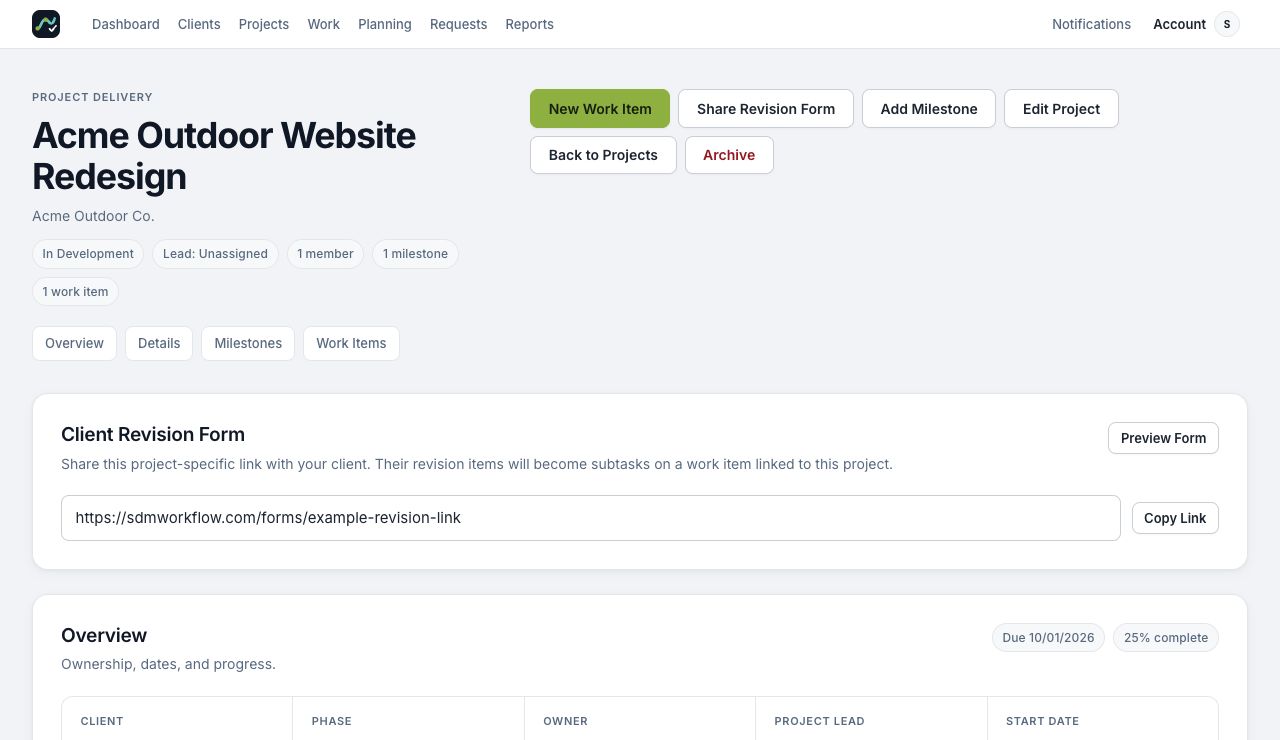
The client does not need an SDM Workflow account or a team seat. Send the copied form link rather than the address of your internal project page. Keep the entire link intact, including the part after the question mark.
Ask for one clear change per item
The client checks the prefilled company and project details and enters their name and email. They can suggest a priority and due date, but your team should review that timing against its other commitments.
For each revision, the client chooses an area, describes the change, and can add a reference URL or a supporting image or PDF. They use Add another revision for the next change. For example:
- Contact page: Change the primary button text to “Request a quote.”
- Header or Navigation: Rename the “Services” link to “What We Do.”
These examples identify both the location and the requested result. A separate item for each change makes it easier to assign and complete work independently. Each attachment can be a JPG, PNG, GIF, WEBP, or PDF of up to 1 MB.
The client chooses Submit Revision Request and receives a confirmation page. The form is for changes to an existing project. For a general request or a potential new project, use the appropriate request form instead.
Review the request and assign the work
Open Requests and select the submission. Read the original details and any files, then use Open beside the linked work reference. SDM Workflow creates one project-linked work item and ordered subtasks for the valid revision items. A file attached to a revision stays with its corresponding subtask.
Review the requested timing, assign responsibility, and update the work status as your team processes the changes. Keeping the work item with its project gives the team a place for its subtasks, discussion, files, deadlines, and time entries.
If a submission has no linked work, check the revision subtask recovery guide before creating duplicate work.
What the form does and does not do
The revision form collects structured written changes and supporting files. It does not let a client click directly on a webpage to place visual annotations. Clients do not enter your internal workspace. SDM Workflow organizes the delivery work; it does not invoice the client or manage a contract.
For the exact form steps, see Share a project revision form. To see how the request fits with projects and planning, visit website revision management.
Ready to try the workflow on your next client project? Start a 14-day SDM Workflow trial. No card is required; the $19 monthly plan includes three active workspace users after the trial.